
Facebook Ad Account Banned? Why It Happens and Exactly What To Do
A banned or disabled Facebook ad account can wipe out a campaign overnight. Here is what the ban actually means, why Meta does it, the recovery steps that work, and how to stop it from happening again.
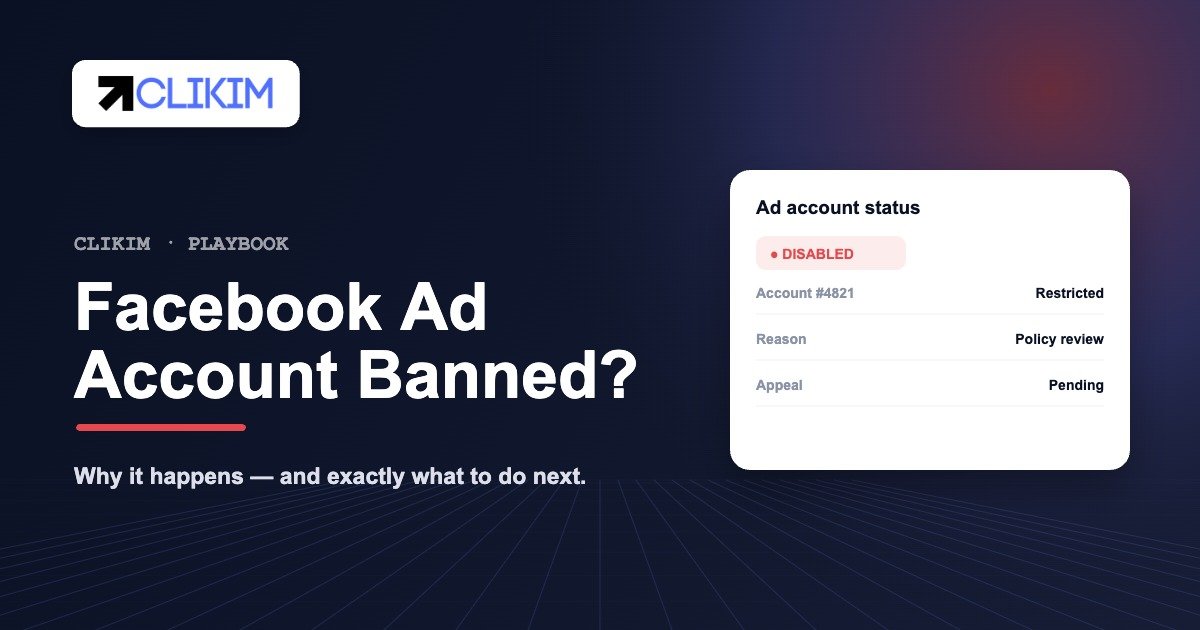
First rule: don’t create new accounts from the same profile or card — that spreads the ban. Open Account Quality, request a review of the disabled account, fix what triggered it, and give the process up to 30 days. If it doesn’t come back, move spend to infrastructure with day-one trust instead of rebuilding from zero.
DON’T SPAWN NEW ACCOUNTS ACCOUNT QUALITY → REVIEW UP TO 30 DAYS FIX THE TRIGGER FIRST
Banned, disabled, restricted or flagged — what's the difference?
Advertisers use "banned" as a catch-all, but Meta treats these as distinct states, and the right response depends on which one you are in. Knowing the difference tells you whether to wait, appeal, fix something, or walk away.
- Restricted — the account stays open but something is limited: a single ad is paused, a spend cap is applied, or a feature is locked. Often the lightest signal and the easiest to clear.
- Disabled ad account — the ad account is shut down and can't run ads until Meta reviews and reinstates it. This is the classic "ad account disabled" message in Ads Manager.
- Restricted Business Manager — the whole Business Manager loses ad capability, taking every ad account inside it with it. More serious, because it affects all your assets at once.
- Permanent ban — the asset will not be restored, usually after repeat violations or attempts to circumvent enforcement. At this point recovery time is better spent elsewhere.
- Flagged / in review — a temporary hold while Meta's systems check the account. Many of these lift on their own within hours.
Open Meta's Account Quality dashboard. It shows the exact status of every account, Page and pixel, the reason for any enforcement, and the button to request a review — the single most useful page when something gets banned.
Why Facebook bans ad accounts
Almost every ban traces back to one of a handful of triggers. Meta's enforcement is largely automated, so it reacts to signals of risk — not just confirmed violations. That's why clean advertisers sometimes get caught: the system saw a pattern it associates with bad actors.
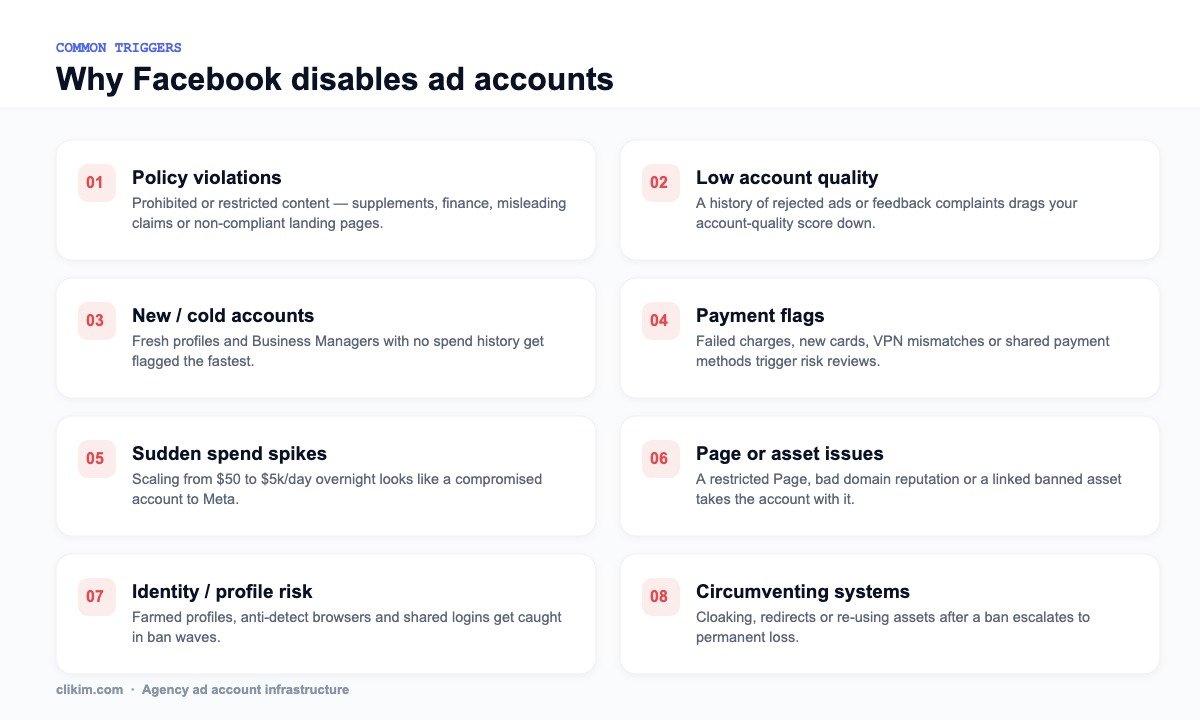
The eight triggers behind most Facebook ad account bans.
The most common causes are policy violations (prohibited or restricted content, misleading claims, non-compliant landing pages), a low account-quality score from a history of rejected ads or user complaints, and risk from new or farmed profiles that have no trusted spend history. Close behind are payment flags, sudden spend spikes that look like a hijacked account, and linked asset problems — a restricted Page or a poor domain reputation can pull an otherwise healthy ad account down with it.
The most damaging category is circumventing systems: cloaking, sneaky redirects, or re-using assets after a ban. Meta treats this as deliberate evasion, and it's the fastest route from a recoverable disable to a permanent ban across every linked asset.
Policy violations: the most common reason accounts get banned
Most disables come back to Meta's Advertising Standards — and crucially, they apply to your whole funnel, not just the ad. Meta crawls the destination, so a compliant creative pointing at a non-compliant landing page still gets flagged.
- Prohibited categories — anything Meta bans outright: illegal products, tobacco and most vaping, weapons, adult content, deceptive or "get-rich-quick" offers, and unsafe supplements.
- Restricted categories — allowed only with written authorization or extra steps: alcohol, gambling and iGaming, cryptocurrency, online pharmacies, financial and credit products, and political/social issues.
- Personal attributes — implying you know a user's race, religion, health condition, age, sexual orientation or financial status ("Are you over 50 and in debt?"). One of the most-missed triggers.
- Misleading claims — unrealistic results, fake countdowns, false scarcity, before/after images, or "as seen on" claims you can't prove.
- Landing-page mismatch — the page must match the ad, load fast, work on mobile, and carry real contact and policy info. Thin pages, broken links and cloaking all get caught.
If you wouldn't be comfortable showing the ad and the landing page to a Meta policy reviewer side by side, assume it will eventually be flagged. Whitehat creative on a clean page is the single biggest protection against policy bans.
Payment issues and billing flags
Billing is one of the most overlooked ban triggers because it has nothing to do with your creative. Meta's risk systems watch payments closely, and anything that looks unusual or fraudulent can freeze or disable an account instantly.
- Failed or declined charges — a payment that bounces at your billing threshold can pause the account immediately and dent its trust.
- Brand-new payment methods — adding a fresh card to a young account, or swapping cards repeatedly, reads as risk. Cards that don't match the account's country make it worse.
- Shared or recycled cards — using one card across many accounts links them, so a single ban can cascade to all of them.
- Threshold jumps — Meta raises your billing threshold gradually as trust builds. Trying to force big spend before the threshold catches up looks like abuse.
- Chargebacks & disputes — disputing a Meta charge with your bank almost always results in a hard, hard-to-reverse ban.
This is exactly why funding model matters. On Clikim's accounts you top up by wire at 0% fees with no personal card on the line — removing an entire class of payment-based bans. (See how Facebook agency ad accounts handle billing.)
Business Manager restrictions vs ad-account bans
There's an important hierarchy. A single ad account getting disabled is recoverable and contained. A Business Manager restriction is far worse — it can take every ad account, Page and pixel inside the BM down at once, freezing your entire operation.
- What triggers it — repeat violations across multiple ad accounts in the BM, failed or incomplete business verification, linking a previously-banned asset, or admins with a history of restricted accounts.
- The ripple effect — because assets share a BM, enforcement on one can be read as a pattern and applied to the whole container.
- Why structure matters — running everything inside one fresh, unverified BM concentrates risk. Established, verified Business Managers carry far more trust and absorb individual issues without collapsing.
This is the core reason agency ad accounts are more resilient: your account lives inside an established, verified BM2500 Business Manager that already has trust and history — so one ad-level issue doesn't endanger your whole stack.
Account quality & the customer feedback score (CAR)
Behind every ban decision is a trust signal most advertisers never check: your account-quality and customer feedback score. Meta surveys people who buy from your ads and scores your account from 1 to 5. Sustained low scores throttle delivery, raise CPMs, and eventually get the account disabled — even with "compliant" ads.
- Where to find it — the Account Quality dashboard shows your feedback score and the specific complaints (shipping, product quality, customer service, expectations).
- The danger zone — a score drifting toward 2 or below means penalties are coming; below 1 typically means a shutdown is imminent.
- What drags it down — slow shipping, products that don't match the ad, poor support, and aggressive or exaggerated marketing that over-promises.
- How to lift it — fix fulfilment and support, set honest expectations in the creative, and proactively resolve refunds before customers complain to Meta.
The feedback score is cumulative and slow to recover, so protecting it is a prevention game, not a cleanup one. A healthy score is what lets trusted accounts scale spend without tripping the automated review systems in the first place.
What to do when your Facebook ad account is banned
Move deliberately. The instinct to immediately rebuild is exactly what turns a single disabled account into a chain of bans. Work the sequence below in order.
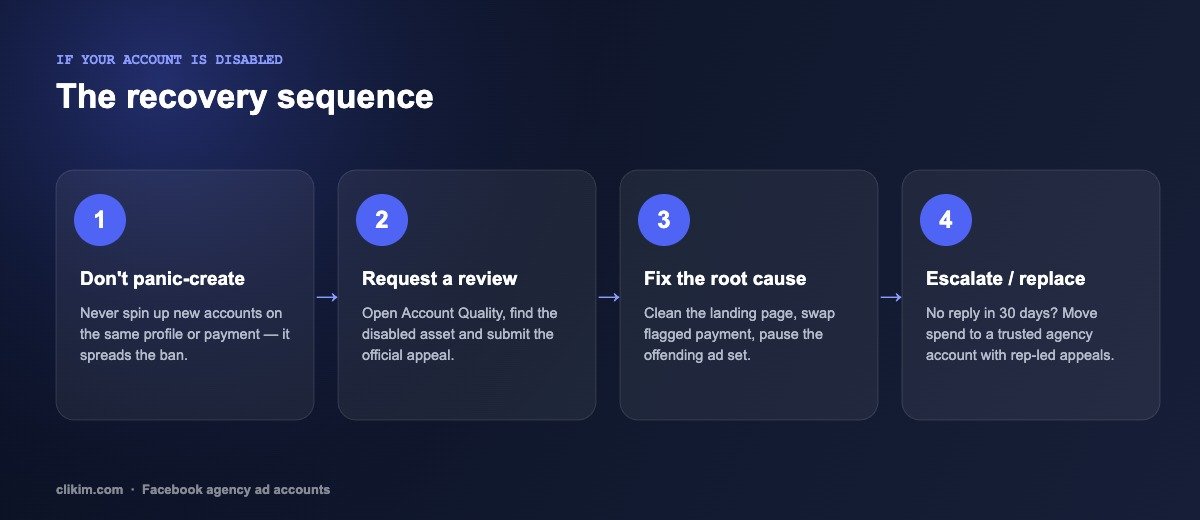
The recovery sequence — in order.
- Don't panic-create. Never spin up new ad accounts, profiles or Business Managers on the same profile, device or payment method. Linked assets share risk signals, so a new account usually inherits the same ban — and can escalate it.
- Request a review. In Account Quality, select the disabled ad account and submit the official appeal. Be concise and factual; don't argue policy, just confirm you've corrected the issue.
- Fix the root cause. Before or right after appealing, remove what triggered it: clean or replace the landing page, swap a flagged payment method, pause the ad set that was rejected, and remove any disallowed claims from your creative.
- Be patient — and parallel-path. Reviews can take hours to weeks. Don't spam appeals; one well-formed request is enough. Meanwhile, keep revenue moving on a separate, trusted account rather than waiting idle.
- Escalate or replace. If there's no resolution after about 30 days, the ban is effectively permanent through self-serve channels. The dependable path back to spending is a fresh account in a high-trust Business Manager with a rep who can appeal on your behalf.
Standard appeals go into an automated queue. A dedicated rep inside an agency Business Manager can escalate a reinstatement or ad-approval directly — which is why agency ad accounts resolve issues in minutes rather than the days a self-serve appeal takes. Meta's own Business Help Center covers the public process, but it can't escalate for you.
How long does a Facebook ad account ban last?
There's no fixed timer. A review of a disabled ad account typically takes anywhere from a few hours to 30 days. Temporary restrictions and "in review" flags often lift automatically once Meta's systems finish checking. A genuine policy disable depends entirely on the appeal outcome.
As a practical rule: if you've submitted one clean appeal and heard nothing for roughly 30 days, treat the account as gone. Continuing to wait — or firing off repeat appeals — rarely changes the result and only delays getting back to spending. At that point, replacement beats recovery.
How to prevent your Facebook ad account from getting banned
Prevention is almost entirely about trust signals. The healthier your account looks to Meta's systems, the more latitude you get. Build these habits in:
- Protect your account-quality score. Every rejected ad and user complaint compounds. Stay comfortably inside policy rather than testing the edges.
- Warm up and scale gradually. Don't 10x daily spend overnight. Smooth, steady increases read as a legitimate growing advertiser.
- Use clean, compliant landing pages. The destination matters as much as the creative — no cloaking, no misleading claims, fast and functional.
- Keep payments stable. A consistent business payment method beats new cards, shared methods, or VPN-masked logins.
- Avoid farmed profiles and anti-detect setups. These are the first targets in ban waves and put every linked asset at risk.
- Run inside a high-trust Business Manager. Whitelisted accounts in an established BM carry more trust, fewer rejections and no preset spend cap — the structural fix that habits alone can't replicate.
When appeals stop working: switch to agency ad accounts
If you're losing accounts faster than you can recover them, the problem usually isn't your campaigns — it's the environment they run in. Personal profiles and brand-new Business Managers start with low trust, tight limits and no support, so a single flag ends the campaign.
An agency ad account flips that. Your ads run inside an established, high-trust Business Manager that already spends at scale, so accounts come whitelisted with no preset spend cap, fewer rejections, and a dedicated rep who can escalate ad approvals and reinstatements directly. At Clikim, every account is issued from our own Platinum HiVA BM2500 Business Manager — we're the infrastructure provider, not a reseller.
Facebook Ad Account Bans in 2026: The State of Enforcement — what triggers bans, real appeal odds, vertical risk multipliers and the ban-proofing stack, with sources and quarterly updates.
Frequently asked questions
Why was my Facebook ad account banned?+
How do I recover a banned Facebook ad account?+
How long does a Facebook ad account ban last?+
Can a permanently banned Facebook ad account be reinstated?+
Will creating a new account get around a Facebook ban?+
How do I stop my account from getting banned again?+
What's the difference between a restricted and a disabled account?+
Tired of losing ad accounts?
Run your campaigns on whitelisted Facebook infrastructure with no spend limits, 0% top-up fees and a rep who handles reinstatements in minutes.