
Facebook Leads Not in Your CRM? The 7 Failure Points
Meta's lead delivery is fire-once: no retry, no resend button, and a spam filter that withholds leads from your API entirely. Here are the seven distinct ways the pipe breaks — each with its symptom signature — plus the CSV backfill SOP and the five-minute ritual that catches everything.
Three facts explain almost every 'lost' Facebook lead: delivery is fire-once (down endpoint = lead never re-delivered, no resend button exists), spam-filtered leads never reach the API at all (they exist only in manual downloads — your CRM will never equal Leads Center), and leads are deleted from Meta after 90 days. Triage by pattern: ALL stopped on a date → token expiry or permissions (check Leads Access Manager — one customization silently unsubscribes every unlisted integration); SOME missing → spam filter, polling gaps, unconnected new forms, field-mapping rejects after form edits; arriving LATE → polling cadence and queue backlogs. Recovery is always the same: CSV export from Leads Center, dedupe on email+phone+time, import tagged as backfill. Prevention: weekly per-form count reconciliation, token calendar, connect-the-form on every launch checklist.
• Meta's lead pipe is fire-once with no retry and no resend button — the single most important fact in lead-gen ops, and it appears in no error message. • Leads live in Meta's Leads Center for 90 days, then they're deleted — the CSV backfill window is finite and closes silently. • The seven failure points have distinct symptom signatures: all-stopped-on-a-date = token; clustered gaps = polling/outage; certain-answers-missing = field mapping; started-when-someone-left = permissions. • Meta's spam filter withholds suspicious leads from API delivery entirely — they exist only in manual downloads, so your CRM count will never equal Leads Center. • Leads Access Manager is the invisible seventh layer: the moment anyone customizes lead access, every unlisted integration silently loses delivery. • Monitor the pipe, not the CRM: a weekly count reconciliation (Leads Center vs CRM, per form) catches every failure mode in one five-minute ritual.
How a lead actually travels (and where it can die)
Someone taps your ad, autofills an Instant Form, hits submit. From there: the lead is written to Meta's Leads Center (attached to the page and form, not the ad account — a detail that matters for permissions), a webhook fires once toward whatever integration is subscribed, and your CRM ingests, maps fields, and creates the record. Three hops, seven distinct places to fail — and because the CRM is the only place most teams look, every failure gets the same useless diagnosis: "the integration broke." The economics of this bug are brutal: instant-form leads decay by the minute (industry speed-to-lead studies put contact rates several times higher inside five minutes than after an hour), so a silently broken pipe doesn't just delay data — it converts paid leads into unreachable strangers while the ads keep spending. This guide is the full autopsy: the seven failure points with their signatures, the triage tree, the recovery SOP, and the five-minute weekly ritual that catches all of it.
The three-pattern triage
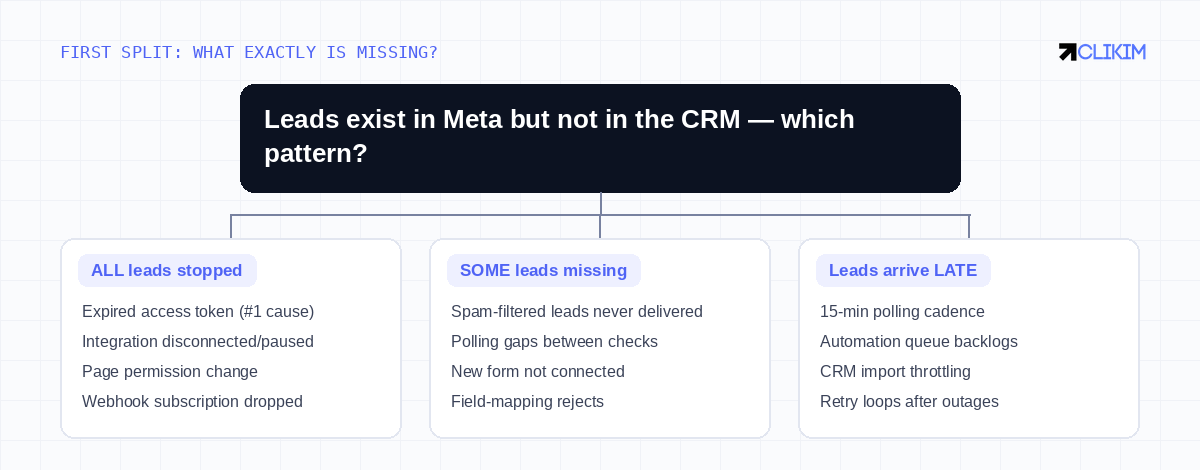
ALL stopped, SOME missing, or arriving LATE — the pattern eliminates most of the seven suspects before you open a settings page.
Before the seven suspects, the pattern. All leads stopped, sharply, on a date — you're looking at credentials or permissions: an expired token, a disconnected integration, a page-role change. Some leads missing while others flow — you're looking at the spam filter, a polling gap, an unconnected new form, or field mapping. Leads arriving late but arriving — that's cadence: polling intervals, queue backlogs, import throttling. Thirty seconds with your CRM timeline and the Leads Center export answers which pattern you have, and the pattern eliminates four or five suspects at once.
The seven failure points
Seven distinct failures, one lazy diagnosis ("the integration broke"). The symptom signature names the row.
#1 — Token expiry, the boring epidemic
The most common cause of the all-stopped pattern is also the least interesting: the access token behind the integration expired or was invalidated. Tokens die on a schedule (commonly ~60 or 90 days depending on type), and they die instantly when the connecting user changes their Facebook password, gets removed from the page, or trips a security checkpoint. The failure is completely silent on Meta's side — the webhook simply stops being authorized, nothing emails you, and the CRM shows an ever-more-peaceful inbox that reads as "leads slowed down" until someone checks the ad's Results column. The fix is a reauthorization in whatever tool owns the connection; the prevention is a calendar entry at 55/85 days, and — for stacks you control — connecting through a system user in Business Manager rather than a human's login, so password changes and departures stop being outage events.
#2 — The withholding filter (the one Meta won't tell you about)
Here is the sentence that resolves a thousand confused agency Slack threads: leads Meta's spam filter flags as suspicious are not delivered through the API at all — no webhook, no CRM record, no error. They exist, you paid for the impressions that generated them, and they appear in exactly one place: the manual download. This is why your CRM count and your Leads Center count never quite reconcile, and why the missing ones are disproportionately the asdf@gmail.com and all-zeros-phone-number entries — though the filter takes real leads with it often enough that writing them all off is a mistake. There is no setting to change this behavior. The operational consequence: every backfill and every reconciliation must use the CSV export, because the API view of your leads is structurally incomplete.
#3–#4 — Gaps in the pipe: polling, outages, and field mapping
Polling-based automations check for new leads on an interval — commonly every 15 minutes — and a lead that fires during a paused zap, a maintenance window, or a rate-limited hour is a lead the next poll may simply never see. The cluster pattern gives it away: missing leads bunched in time, matching an outage log. The durable fix is moving from polling to webhook-based delivery (push, not pull), and — more important — monitoring the automation layer itself instead of inferring its health from CRM volume. Field mapping fails differently: the integration receives the lead and the CRM rejects or mangles it, typically right after someone edited the form. Custom questions are matched by their names — rename "What's your budget?" to "Monthly budget?" and every integration mapped to the old name silently orphans that answer, which in stricter CRMs (required fields, validation rules) kills the whole record. The rule that prevents it: every form edit is a mapping review, no exceptions.
#5–#6 — Permissions, and the invisible Leads Access Manager
Lead data hangs off the page, so page-level and Business-Manager-level changes break delivery in ways ad-account permissions never would: the employee who originally connected the CRM leaves, an agency partnership ends, page roles get "cleaned up" — and delivery stops the same day, which is your forensic clue. The deeper cut is Leads Access Manager, the least-known screen in Business Settings: by default everyone with page access can read leads, but the moment anyone customizes access, the model flips to allowlist-only — and every CRM and integration not explicitly assigned loses delivery silently. It's the classic "we changed nothing, it just stopped" culprit, because the person restricting access for a compliance request had no idea they were unsubscribing the CRM. If the all-stopped date matches any personnel or permission event, check this screen before touching a single token.
#7 — The new form nobody connected
The simplest one, saved for last because of how often it survives audits: most integrations subscribe to specific forms, not to the page — and a new form launched with last Tuesday's campaign delivers nothing until someone connects it. Old forms flowing while the newest is silent is the entire signature. Bake "connect the form" into the campaign-launch checklist, next to the UTM check.
The recovery SOP: CSV backfill against the 90-day clock
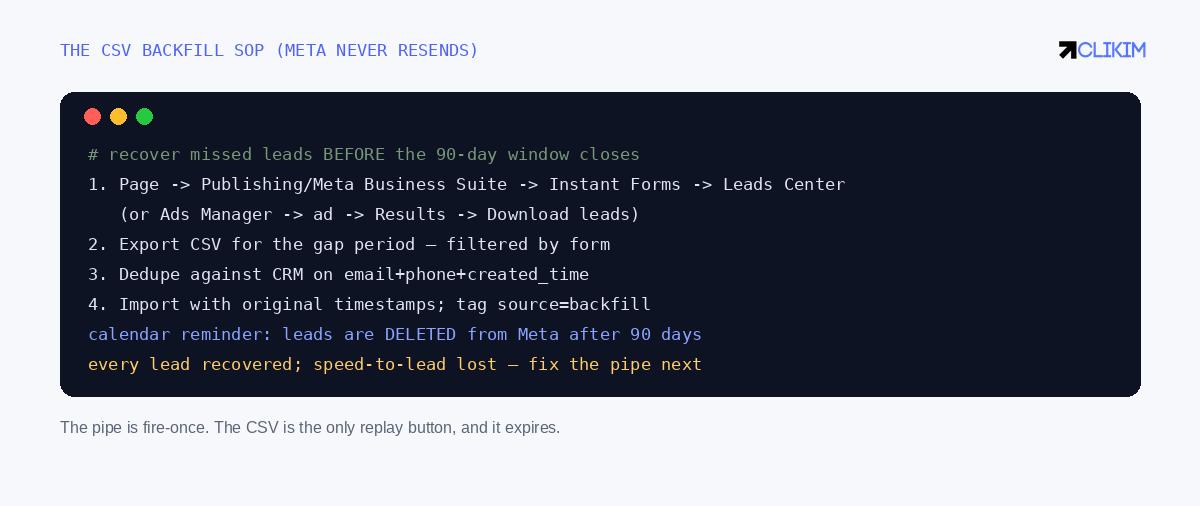
The only replay button Meta gives you — and it has an expiry date.
Whatever broke, recovery is the same, because Meta never re-delivers through the pipe. Export the gap period from Leads Center (or per-ad via the Results column — Meta's download documentation covers both routes), dedupe against the CRM on email + phone + created time, and import with original timestamps, tagged as backfill so your speed-to-lead metrics don't lie to you later. Two hard deadlines govern this: leads are deleted from Meta's side at 90 days, and the leads' commercial value decays much faster than that — a backfilled lead from three weeks ago is data, not opportunity. Run the export the day you discover any gap, then fix the pipe.
A worked example: the 34 missing leads
Composite case, familiar shape. A lead-gen account spends $4,900 in July; Ads Manager reports 212 leads; the CRM holds 178. Where are the 34? The reconciliation: Leads Center export shows all 212 — so nothing is lost, only undelivered. Eleven are spam-withheld (the export's obvious junk plus three that look real — called anyway, one books). Nineteen cluster between July 9–11 — matching a Zapier auth error nobody saw; token had expired on the 9th, and the zap's own history confirms zero runs for 60 hours. Four came from the new "July Promo" form that was never connected. Total recovery: 23 real leads backfilled, one closed deal from the spam pile, and two process changes (token calendar, launch checklist) that make the next audit boring. Time cost: about 90 minutes. The alternative — the default — was never knowing, and 34 paid leads quietly aging out at day 90. At this account's $23 cost per lead, the missing rows represented $782 of paid inventory sitting in a CSV nobody had downloaded.
The five-minute weekly ritual
Every failure mode above is caught by one reconciliation: weekly, per form, compare the Leads Center count to the CRM count, expecting a small stable delta (the spam-withheld share). Delta widened? Something in the seven broke this week, and you're finding out in days, not quarters. Pair it with a monthly test lead through your own form — watching it land in the CRM within the expected latency — and with the same monitoring discipline your pixel gets. Lead-gen stacks fail quietly by design; the counterweight is a loud calendar.
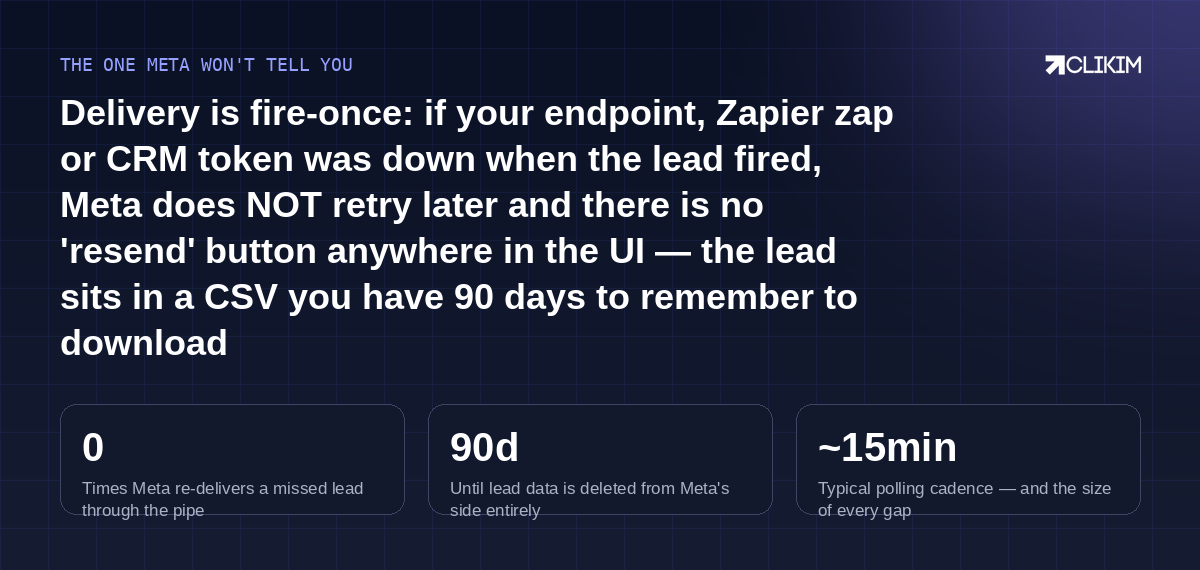
Fire-once delivery, a 90-day clock, and a filter that hides leads from your API — the three facts that explain almost every 'lost' lead.
Frequently asked questions
Why are my Facebook leads not showing up in my CRM?+
Does Meta resend leads that failed to deliver?+
How long do Facebook leads stay available for download?+
Why do some leads appear in Leads Center but never reach my integration?+
What is Leads Access Manager and why did it break my integration?+
My leads stopped on an exact date — what happened?+
Why don't leads from my newest form sync?+
Can editing my Instant Form break lead delivery?+
How do I backfill missed leads into my CRM?+
What's the best way to catch lead delivery failures early?+
Should I use webhooks or polling for Facebook leads?+
Do missed leads still cost me money?+
Lead flow fixed, account to match
Whitelisted infrastructure for lead-gen operators — stable infrastructure on the ad side while you keep the pipe honest.