
Facebook Conversions API (CAPI): The Complete Setup Guide
Browser tracking is leaky in 2026, and the conversions you can't see are the ones you optimise away. The Conversions API recovers that lost signal from your server. Here's what CAPI is, which events to send, the three ways to set it up, and how to do it without double-counting.
The Facebook Conversions API (CAPI) sends conversion events to Meta from your server, recovering events the browser pixel loses to ad-blockers and privacy limits. It runs alongside the pixel — both fire the same events and deduplicate by a shared event ID. Set it up via a partner integration (easiest), the Conversions API Gateway (no-code), or the direct API (most control); send strong customer-matching parameters to raise event match quality; and verify deduplication so each conversion counts once.
• CAPI sends conversions to Meta from your server, recovering events the browser pixel loses. • It runs alongside the pixel, not instead of it — both fire and deduplicate by event ID. • Three setup paths: partner integration (easiest), Gateway (no-code), or direct API (most control). • Deduplication (matching event ID + name) is what stops double-counting. • Strong customer-matching parameters raise event match quality and attribution. • Better signal means better optimization, more accurate costs, and fewer wrongly-cut winners. • Tracking only pays off on an account that stays live to use it.
What the Conversions API is
The Conversions API (CAPI) is a way to send your conversion events — purchases, leads, add-to-carts — to Meta directly from your server, rather than relying solely on the browser-based pixel. For years the pixel did this job alone, firing from the visitor's browser. The problem is that the browser has become a leaky place to measure anything: ad-blockers strip the pixel, privacy settings and iOS limits suppress events, and a meaningful share of your real conversions simply never reach Meta. CAPI closes that gap by reporting from a place the browser can't block.
Crucially, CAPI does not replace the pixel — the two work together. The browser pixel and the server send the same events, Meta deduplicates them, and the result is a far more complete picture than either could provide alone. If your pixel has ever shown fewer conversions than your store's back end, this guide is how you fix it for good. (If the pixel itself is misbehaving first, start with why your pixel isn't working before layering CAPI on top.)
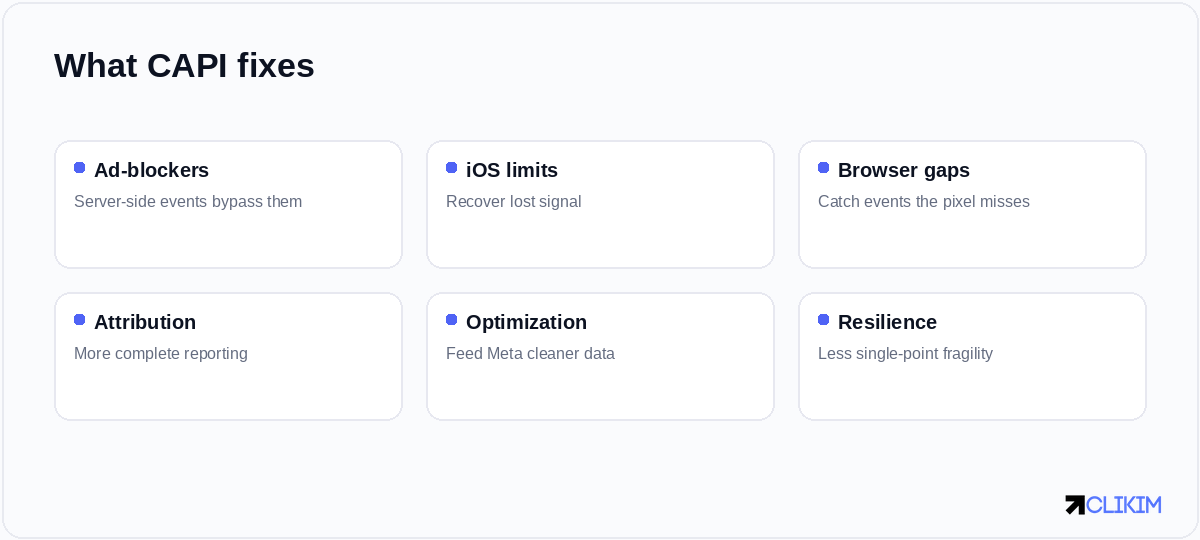
CAPI exists to recover the conversions the browser quietly loses — and to make your data harder to break.
Why it matters in 2026
Signal loss is no longer a niche concern; it's the default condition of web tracking. Between tracking-prevention in browsers, the long tail of iOS changes, and consent tools that block events until opt-in, browser-only measurement undercounts conversions — sometimes badly. The exact amount varies by audience and setup, but a double-digit-percentage undercount is common, and it's entirely invisible unless you go looking for it.
That undercount isn't just a reporting annoyance. Meta optimises toward the conversions it can see, so if a chunk of your purchases are invisible, it learns from a distorted sample, your reported cost per acquisition looks worse than reality, and you may pause ads that were actually profitable. Clean server-side data is the difference between optimising on signal and optimising on noise — and at scale, that difference compounds into real money.
Pixel vs Conversions API
It helps to be precise about how the two differ, because the goal is to run both, not to pick one.
CAPI doesn't replace the pixel — the two run together and deduplicate, covering each other's gaps.
Think of the pixel as the front-of-house measurement and CAPI as the back-of-house one. The pixel still adds value — it captures rich browser context and is easy to deploy — but on its own it's fragile. CAPI is the resilient backstop that keeps measuring when the browser can't. Run them as a pair and you get coverage neither achieves alone.
How CAPI works
When a conversion happens, your server sends an event to Meta's API containing the event name (e.g. Purchase), a unique event ID, and customer-matching parameters (hashed email, phone, IP, and so on — the more you provide, the better the match). The browser pixel fires the same event with the same event ID. Meta sees both, recognises them as the same conversion via the shared ID, and counts it once.
That deduplication step is the entire trick, and getting it right is what separates a clean CAPI setup from a double-counted mess. The mental model to hold: two messengers, one message, matched by a shared ID so the message is only heard once. Everything else in this guide is in service of that.
Which events to send
You don't have to send everything, but you should send the events that matter to optimisation and reporting — especially the deep-funnel ones the browser is most likely to lose.
Send your key conversion events from both sources; the deeper the funnel, the more it matters to capture.
For ecommerce, Purchase is non-negotiable and the mid-funnel events sharpen optimisation; for lead gen, Lead and CompleteRegistration are your core events. The rule of thumb: the closer an event is to the money, the more it hurts to lose it, so prioritise capturing those server-side first.
The three ways to set it up
There's no single "install CAPI" button — there are three routes, and the right one depends on your stack and how much control you want.
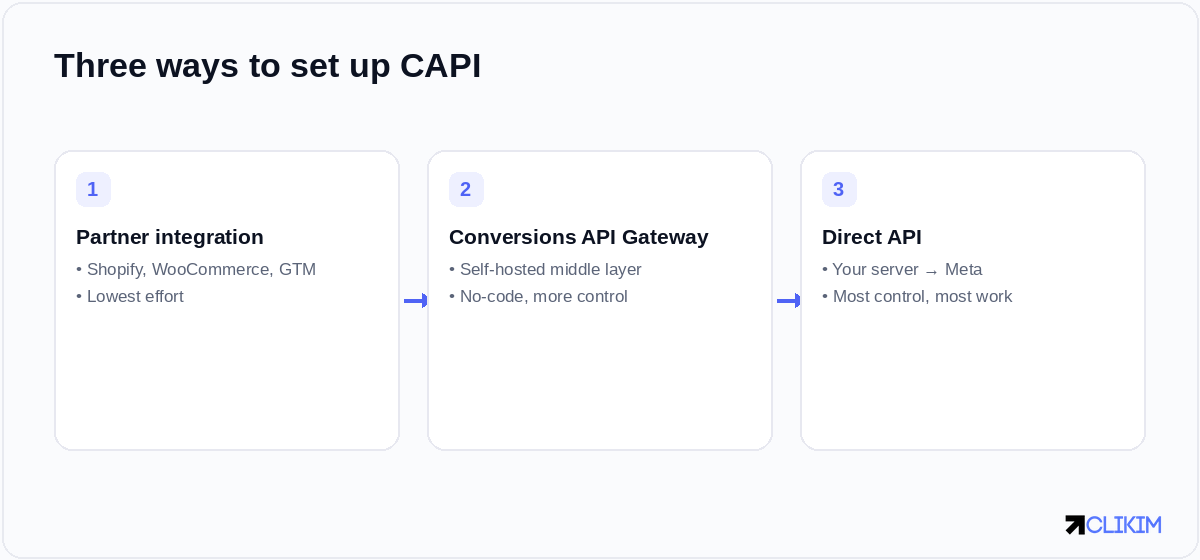
Three setup paths: a partner integration for most stores, the Gateway for no-code control, or the direct API.
Pick the lightest method that gives the control you actually need — most stores start with a partner integration.
1. Partner integration (easiest)
If you're on Shopify, WooCommerce, or using Google Tag Manager, you can often enable CAPI through a built-in integration or an official connector. You authenticate, map your events, and the platform handles the server-side sending and — done well — the deduplication too. This is where most ecommerce stores should start: it covers the majority of the value for a fraction of the effort, and it's the least likely to introduce bugs.
2. Conversions API Gateway (no-code, more control)
The Gateway is a self-hostable middle layer that sends server events for you without custom development. It's a good fit for teams that want better match quality and more control than a basic plugin offers, but don't have — or don't want to spend — developer time on a direct build. It sits between your site and Meta and handles the heavy lifting.
3. Direct API (most control)
The most powerful and most involved route: your own server sends events straight to Meta's Conversions API. You get complete control over which events fire, what parameters you attach, and how deduplication is handled — at the cost of real engineering work and ongoing maintenance. Reserve this for custom stacks where the off-the-shelf options genuinely don't fit.
Setting it up, step by step
- Choose your method based on your platform and dev resources (most stores: partner integration).
- Generate an access token in Events Manager for the dataset (pixel) you're sending to.
- Send both browser and server events for your key conversions, using a shared event ID on each pair.
- Pass strong customer-matching parameters (hashed email, phone, etc.) to raise your event match quality.
- Confirm deduplication so each conversion counts once, not twice.
- Monitor for a week and watch match quality and additional conversions appear.
Event deduplication (don't skip this)
The single most common CAPI mistake is double-counting, and it comes from broken deduplication. To dedupe, every event must be sent from both the browser and the server with the same event name and the same event ID. Meta matches the pair and keeps one.
If your numbers suddenly double after enabling CAPI, deduplication is almost always the culprit — check that your event IDs actually match across the two sources. A good partner integration handles this for you; a hand-rolled setup is where it most often goes wrong, so test it deliberately before trusting the data.
Event match quality
Sending an event is only half the job; Meta also has to match it to a person. Event match quality is the score that reflects how well it can, based on the customer parameters you include — hashed email, phone, name, location, external ID and so on. The more high-quality parameters you send (properly hashed, correctly formatted), the better the match and the more useful the event for both optimisation and attribution.
It's worth treating match quality as a metric to actively improve, not a box to tick. Passing email plus phone plus a stable external ID, where you have consent, can move match quality from mediocre to strong — and that improvement flows straight through into better-performing campaigns.
Verifying it works
Open Events Manager and check three things: that server events are arriving (you'll see a "server" source on your events), that they're being deduplicated against browser events, and that your event match quality is healthy. Use Test Events to watch live conversions flow in from both sources in real time as you place a test order.
If something's missing — events not arriving, or arriving but not matching — the diagnosis overlaps heavily with ordinary pixel troubleshooting: check the install, the IDs, and the parameters in that order.
Common mistakes
- No deduplication — sending server events without matching event IDs, doubling your numbers.
- Weak match parameters — low event match quality means Meta can't attribute events to people.
- Server-only or browser-only — running just one source instead of both, leaving gaps.
- Ignoring consent — sending events you don't have consent for, creating compliance risk.
- Set-and-forget — never checking match quality or whether events still flow after a site change.
Does CAPI actually improve performance?
It improves the inputs to performance, which usually shows up in results over time. With more complete conversion signal, Meta optimises toward better prospects, your reporting matches reality more closely, and you make fewer bad decisions based on undercounted data. The brands that benefit most are those scaling spend, where small percentage gains in signal compound into meaningful differences.
It's not a magic switch that drops your costs overnight — anyone promising that is overselling. It's the foundation that makes everything downstream, from Advantage+ campaigns to manual scaling, work on accurate data instead of a distorted sample.
Tracking needs an account that stays live
Perfect tracking is wasted on an account that keeps dropping out from under it. The whole point of clean signal is to scale on it — and scaling is exactly where fragile accounts buckle. That's why serious advertisers pair a solid CAPI setup with a stable, high-trust ad account that won't reset their data with every restriction. Tracking and infrastructure are two halves of the same job: measure cleanly, then run somewhere that lets you act on it without interruption.
iOS 26 and the fbc key — why CAPI match keys matter more since Safari stripped fbclid. the Shopify mismatch — what clean CAPI should reconcile against.
Frequently asked questions
What is the Facebook Conversions API?+
Does the Conversions API replace the pixel?+
How do I set up the Conversions API?+
What is event deduplication?+
Why did my conversions double after enabling CAPI?+
What is event match quality?+
Which events should I send via CAPI?+
Which CAPI setup method should I use?+
Does CAPI improve ad performance?+
Do I need consent to send events via CAPI?+
How do I verify CAPI is working?+
Does CAPI help if my account keeps getting banned?+
Clean data deserves an account that stays live
Run on managed whitelisted infrastructure so your pixel and CAPI signal actually get used at scale — no spend caps, with a dedicated rep.