
Facebook Pixel Not Firing? Diagnose by Symptom
“Pixel not firing” is five different problems wearing one dashboard symptom. Whether ALL events are dead, only Purchase is missing, or only some users vanish tells you exactly which of three branches you're on — and two of them are fixable this afternoon.
First question: which events are missing, for whom? ALL events dead → a loading problem: cache/speed plugins deferring JS (WP Rocket's “Delay JavaScript execution” is the #1 WordPress pixel killer — exclude connect.facebook.net), unpublished GTM containers, wrong pixel ID. Purchase-only missing → a placement problem: the event sits on a thank-you page your gateway redirect or SPA checkout skips — fire it from the payment webhook with a shared event_id instead. Some users only → not a bug: Safari/iOS privacy, EU consent rejections (40–70%), in-app browsers — recover the recoverable via CAPI + match keys, accept the structural remainder. Run the 10-minute loop first: Incognito + Meta Pixel Helper + Events Manager Test Events.
• Stop asking "why is my pixel not firing" and ask WHICH events are missing for WHOM — all-events, Purchase-only, and some-users-only are three different problems with three different fixes. • Cache/speed plugins are the #1 WordPress pixel killer — WP Rocket's "Delay JavaScript execution" holds Meta's script until an interaction that bouncing visitors never make. • Purchase-only failures are almost always a placement problem: the event lives on a thank-you page your payment flow skips. • Some-users-only gaps are mostly not bugs: Safari privacy, EU consent rejections (40–70% of visitors), and in-app browsers block events by design. • Run the 10-minute verification loop (Incognito → Pixel Helper → Test Events) before touching code — the symptom names the branch. • A server-side setup cannot recover events the browser never fired — CAPI complements the pixel; it doesn't resurrect it.
The symptom split that replaces guesswork
"Pixel not firing" is not one problem — it's a family of at least five, and the forums treat them as one because the dashboard symptom looks identical: numbers too low. The fastest diagnostic question in Meta tracking is: which events are missing, and for whom? If everything is dead, your base code never loads — a loading problem. If PageView fires but Purchase doesn't, your base code is fine and the event's placement is wrong. If everything fires but only for some visitors, nothing is broken at all — you're looking at the privacy layer doing what it's designed to do. Three branches, three completely different repair kits, and the first two are fixable this afternoon.
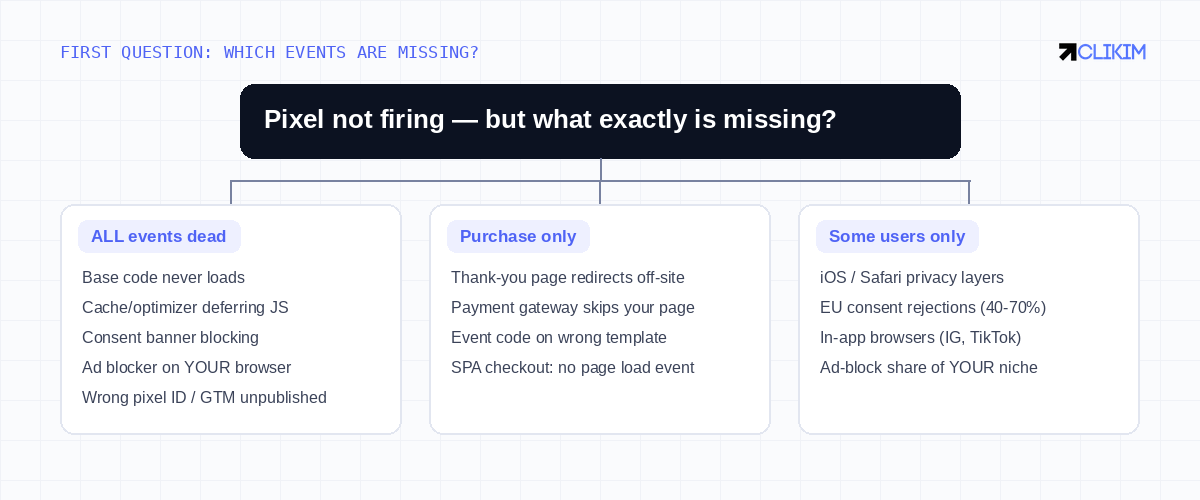
Three symptoms, three branches — identify yours before opening a single settings page.
The 10-minute verification loop (do this first)
Before touching code, establish ground truth. Open your site in an Incognito window with no ad blocker — a startling share of "my pixel is broken" reports are the store owner's own uBlock. Install Meta Pixel Helper and load your homepage: a lit badge with PageView means the base code loads and you can skip the entire first branch. Then open Events Manager → Test Events, browse your own store and run a test purchase: this shows browser and server events side by side in real time, per event type — the exact screen that turns "something's wrong" into "Purchase is missing from the browser channel only." Ten minutes, zero code, and you've replaced twelve possible causes with two or three.
Symptom → cause → fix
Five symptoms, five different repairs — the diagnosis IS the fix selection.
Branch 1: ALL events dead — the loading problem
The base snippet (or your GTM container) never executes. On WordPress the overwhelming favorite is a cache or speed plugin deferring JavaScript: WP Rocket's "Delay JavaScript execution," Flying Press, LiteSpeed and friends hold third-party scripts until the user interacts — scroll, click, keypress. Visitors who land and bounce, the exact traffic you're paying Meta to measure, never trigger the interaction, so the pixel never loads for them. The fix is one line: exclude connect.facebook.net and fbevents.js from the delay/defer list, purge the cache, re-test in Incognito. The runners-up: a GTM container edited but never published (the preview works, production doesn't — the classic), a consent banner in "block until accept" mode that nobody accepts (see branch 3), a wrong or retired pixel ID pasted from an old integration, and two theme/plugin installs fighting each other. Meta's pixel docs show the canonical snippet if you need to compare against what your theme actually outputs.
Branch 2: Purchase-only — the placement problem
PageView proves your base code loads everywhere; a missing Purchase means the event call lives somewhere users never go. The classic: the Purchase snippet sits on /thank-you/, but your payment gateway redirects buyers to its own confirmation page — or a checkout app replaced the template, or a custom funnel skips the page entirely. Single-page-app checkouts add a subtler version: the "page" changes without a page load, so a pageview-triggered Purchase tag never sees a trigger — it needs a history-change or custom-event trigger instead. The robust fix for gateway flows is to stop depending on the browser at that moment entirely: fire Purchase server-side from the payment webhook (the order exists whether or not the buyer ever sees your thank-you page), with an event_id shared with the browser event so deduplication merges the copies whenever both fire.
Branch 3: some users only — the privacy layer, not a bug
If events flow but sit 20–40% under your backend, nothing is "not firing" — a share of your visitors is invisible by design. Safari and iOS strip and expire tracking parameters (iOS 26 now removes fbclid entirely), EU consent banners see 40–70% rejection rates — for those visitors the pixel is legally forbidden to fire, and firing it anyway is a compliance problem, not a fix — in-app browsers inside Instagram and TikTok mangle scripts, and ad-block share runs 15–40% depending on your niche. The honest repair kit: a server-side channel (CAPI) with rich match keys to recover the recoverable share — that's an Event Match Quality project, not a pixel project — plus the discipline to accept that a fraction of the gap is structural. What no tool can do, despite the sales pages: a server cannot forward an event the browser never created. CAPI complements the pixel; it doesn't resurrect it.
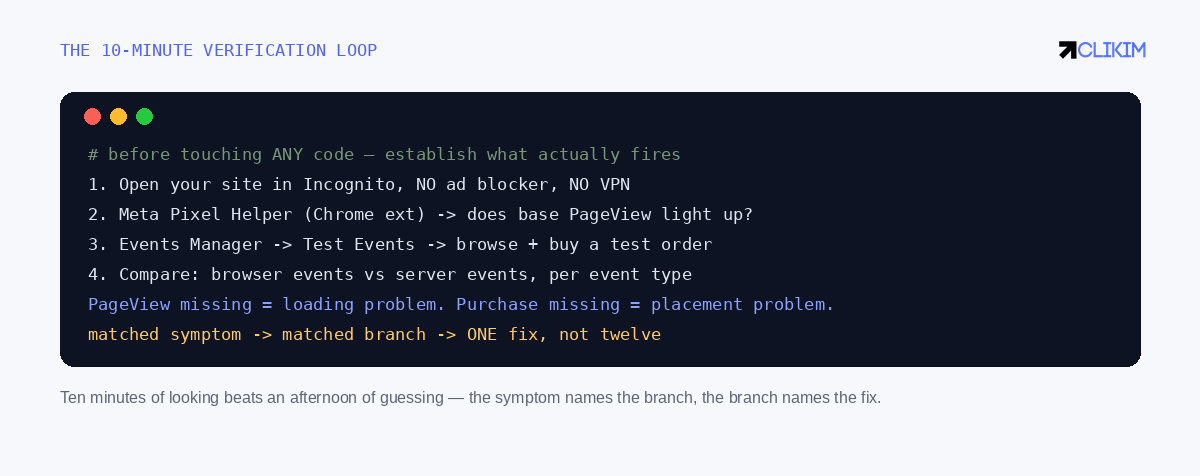
The loop that turns a vague complaint into a named branch — run it before every 'fix'.
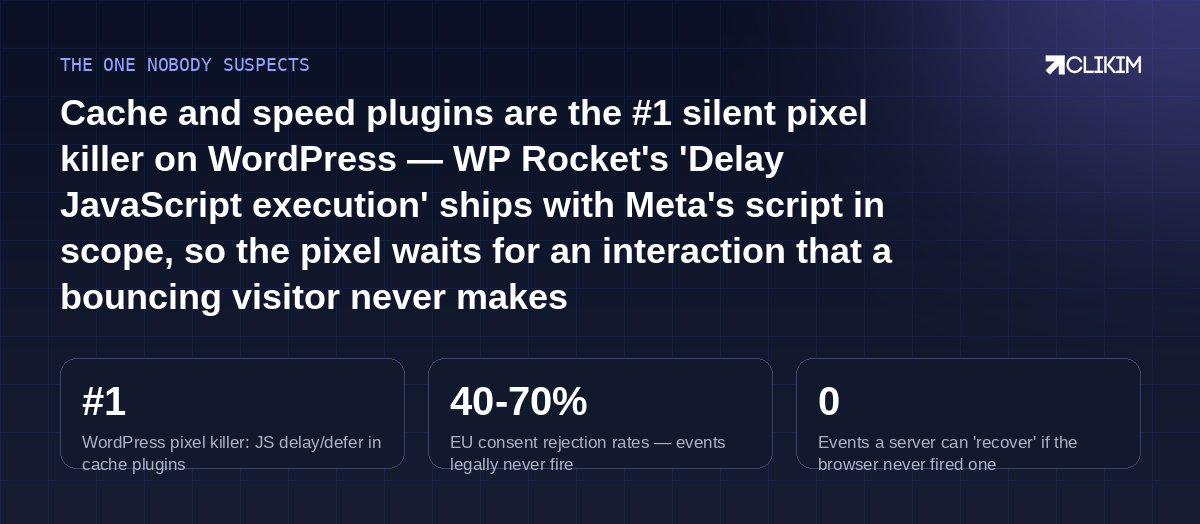
The usual suspect is your speed optimization, the biggest 'gap' is legal, and no server resurrects an unfired browser event.
Frequently asked questions
Why is my Facebook pixel not firing at all?+
Why does PageView fire but Purchase doesn't?+
How do I test if my pixel is working?+
Does WP Rocket block the Facebook pixel?+
Pixel Helper says no pixel found — but I installed it?+
Why does my pixel fire for some users but not others?+
Will server-side tracking (CAPI) fix a pixel that doesn't fire?+
My events fire twice — is that related?+
Events show in Pixel Helper but not Events Manager?+
How long after fixing should events appear?+
Do consent banners really block the pixel for most EU visitors?+
Should I just reinstall the pixel from scratch?+
Clean signal, sturdy account
Whitelisted infrastructure with dense history — every event you fix lands on infrastructure built to use it.