
Dayparting Facebook Ads: Smart Optimization or Wasted Effort?
The 3am row in your hourly report is the most seductive false insight in Ads Manager. Here's why hourly data lies, the one honest question that decides the dayparting call, the operationally time-bound cases where it genuinely pays — and what to do with the energy otherwise.
Default answer: run 24/7 and let the pacing system work — it already allocates budget across the day’s auctions by expected value, and most hourly “insights” are attribution lag plus tiny samples.
Dayparting genuinely pays only when the clock changes what a conversion is worth operationally: call centers staffed 9–6, delivery windows, local opening hours, speed-to-lead SLAs.
If that’s you: lifetime budgets, audience timezone, generous windows, a 4-week 24/7 baseline to beat, and monthly reviews. Same-hour delivery cliffs, by the way, are usually a spend cap — not a scheduling insight.
- Dayparting = restricting delivery to chosen hours — available only with lifetime budgets.
- The pacing system already optimizes by hour — most manual schedules just re-do its job, worse.
- Most hourly 'insights' are attribution lag + tiny samples wearing a costume.
- Real dayparting cases are operationally time-bound: call centers, delivery windows, local hours.
- Standard ecommerce almost never benefits — checkout works at 3am, and overnight auctions are cheap.
- If you do it: audience timezone, generous windows, a 4-week baseline, monthly review.
- The cost nobody prices: scheduled campaigns surrender pacing freedom and re-learn on the switch.
The 3am conversion problem
Every media buyer eventually has the 3am moment. You're in the hourly breakdown, and there it is: conversions between 2 and 5am cost double the daily average. The conclusion writes itself — we're wasting money while everyone sleeps — and the fix looks equally obvious: schedule the ads for waking hours, pocket the savings, feel like an optimizer. It's one of the most satisfying-looking moves in Ads Manager, which is exactly why it deserves suspicion.
Here’s what that hourly table doesn’t show you:
- The pacer got there before you — Meta’s pacing system already allocates budget across the day’s auctions by expected value. Overnight hours get whatever spend they get because the system found cheap, worthwhile auctions there, not because it forgot to stop.
- Attribution scrambles the clock — conversions report on click time, so the 3am row mixes genuine insomniac purchases with lag artifacts, and weekend rows bleed into Mondays — per the mechanics in our attribution guide.
- The sample is a rounding error — a $200/day account has perhaps a dozen conversions spread across 24 hourly buckets; the “expensive” hour is often three conversions and a coin flip.
None of which means dayparting is always wrong. It means the default question is backwards. Not "which hours look bad?" — but "is there something about my business that makes an hour genuinely different?" That question has real yeses, and they're the whole legitimate territory of this tactic.
The noise machine: why hourly data lies
Most hourly 'insights' dissolve under attribution adjustment and honest sample sizes.
Run the honest version of the analysis before believing any row: pull four-plus weeks of hourly data (one week is astrology), read it by click time with attribution in mind, and demand each hour carry enough conversions to mean something — a useful floor is 30+ per bucket you intend to act on.
Then compare against what the pacer already does: if “good hours” already receive proportionally more spend, the system has priced the pattern, and your schedule would merely re-implement it while destroying its flexibility. Most hourly reports, put through that wringer, come out flat.
Where dayparting genuinely earns its keep
The pattern: daypart when fulfillment is time-bound — not when a dashboard hour looks ugly.
Every legitimate row shares one property: the conversion’s value depends on the clock for operational reasons. A lead that lands at 11pm and gets called at 9am converts at a fraction of one called in five minutes — dayparting to staffed hours isn’t optimizing auction prices, it’s aligning spend with fulfillment capacity.
A pizza ad at 3am sells nothing the kitchen can deliver. A plumber’s “call now” ad works when someone answers. In each case the hour changes what the conversion is worth, which is information the auction cannot see — the one thing you know that the pacer doesn’t.
Notice what's absent from the table: any version of "our CPAs look better between X and Y." Auction-price patterns are the pacer's territory, and it plays that game continuously with better data. Your edge is exclusively the operational layer — staffing, delivery windows, expiry, follow-up speed. Daypart on operations, never on vibes.
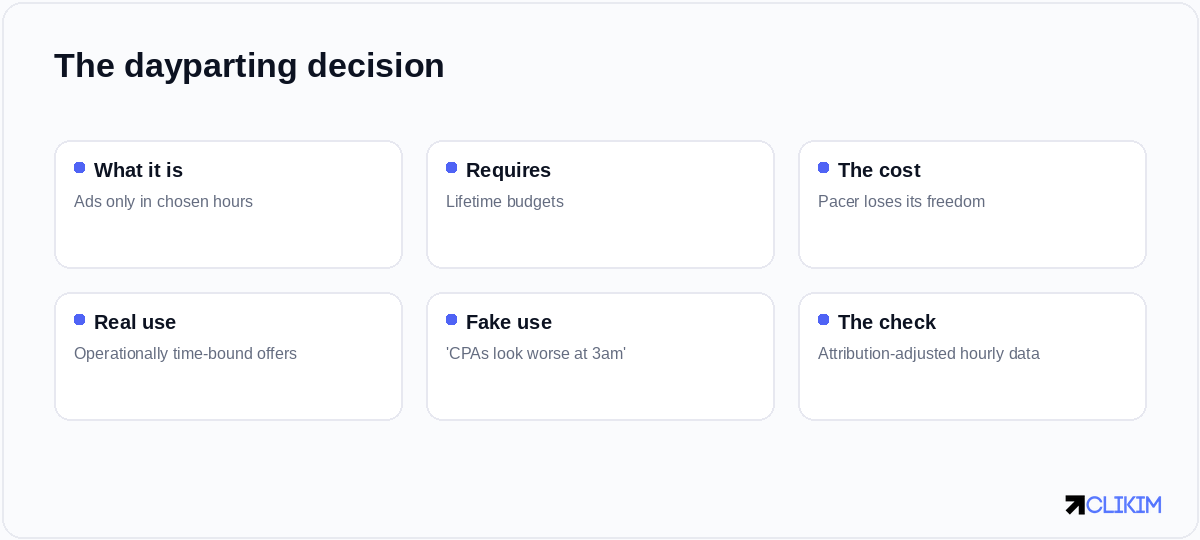
One honest question decides it: does the clock change what your conversion is worth?
Meet the system you'd be overruling
Since the whole argument turns on the pacer, meet it properly. Given a daily budget, Meta’s pacing system doesn’t spend evenly — it forecasts the day’s auction landscape and distributes your budget toward the hours where expected value runs highest, adjusting in real time as reality diverges from forecast.
Cheap overnight inventory? It buys. A lunchtime competition spike? It eases off and returns later. That smooth spend curve you see isn’t a metronome; it’s continuous arbitrage across thousands of hourly price movements you’d never see in a breakdown report.
This is why manual dayparting for price reasons is redundant at best: you're overruling a system that plays the hourly market with fresher data, no sleep requirement, and per-auction granularity your schedule can't express. The schedule's only legitimate cargo is what the pacer can't know — your staffing, your kitchen hours, your follow-up SLA. Everything else, it already handles; the kindest thing you can do for it is a stable budget and a full 24-hour canvas.
The switch has a price tag
Dayparting isn’t free even when it’s right. The mechanics require lifetime budgets, which changes how pacing behaves and costs you the set-and-forget rhythm of daily budgets.
The schedule itself constrains the pacer: hours you remove aren’t just hours you don’t spend — they’re auctions the system can no longer arbitrage when they happen to run cheap, and compressed delivery windows can push you into more expensive competition inside the hours you kept. And the transition triggers re-learning: a significant scheduling change is a significant edit, with the usual learning-phase consequences.
Does ad scheduling work with CBO or Advantage+?
Scheduling is an ad set setting under lifetime budgets and constrains whatever sits above it. Advantage+ shopping doesn’t support manual dayparting — if your case is genuinely operational, it belongs in a manual scalpel campaign.
So price the trade honestly: the operational gain (answered calls, deliverable orders, fast follow-up) must beat the auction flexibility you surrender plus the transition cost. For call-center lead gen the math usually clears easily. For "we think mornings are better" it almost never does.
If you do it: the ten-minute mechanics
If the case is real, the mechanics take ten minutes — the discipline is in the before/after comparison.
Three details carry the execution:
- Timezone — schedules run in the audience’s timezone (or a fixed one you choose). A multi-timezone national campaign scheduled “9 to 6” means different things in Boston and Boise; decide which you mean.
- Generosity — trim the genuinely dead operational hours rather than sniping down to a “perfect” six-hour window. Narrow windows concentrate spend into peak-competition hours and can raise your average CPM more than the trimming saves.
- The baseline — keep four weeks of 24/7 performance data from before the switch and compare honestly after: total results and blended CPA, not the flattering hourly view. Schedules that can’t beat their own baseline go back to 24/7 without sentiment.
Two verdicts from the field
The lead-gen shop that should have dayparted sooner. A solar-installation funnel generated leads around the clock but staffed dialers 8am–7pm. Speed-to-lead data told the story: leads called within ten minutes booked at 31%; leads from the overnight bucket, called the next morning, booked at 9%. Every overnight lead was two-thirds wasted by the clock.
Scheduling delivery to 7am–6pm (an hour ahead of the dialers, letting the morning queue fill) cut lead volume 22% and raised booked appointments 18% — fewer conversions, more business. Operational time-boundness, priced and captured.
The store that dayparted itself into a hole. An ecommerce brand cut “wasteful” midnight–6am delivery after a two-week hourly read. Blended CPA rose 11% within a month: the schedule had deleted the cheapest auctions of the day, compressed spend into peak-competition hours, and triggered a re-learning wobble — all to prevent purchases that, on the four-week attribution-adjusted view, had been profitable anyway.
They reverted, the pacer resumed its overnight bargain-hunting, and the “insight” was retired to the kill log. Same tactic, opposite verdicts — separated only by whether the clock genuinely changed conversion value.
My ads stop delivering at the same time every day — should I daypart?
No — that’s the signature of your account spending limit being reached daily, not an optimization opportunity. Raise or remove the cap (or move to an uncapped account); the “schedule” is a ceiling wearing a costume.
What to do instead (the usual answer)
If you arrived here hunting efficiency and dayparting isn’t your case, the same energy pays better elsewhere — in the order our optimization routine ranks them: creative rotation against fatigue (the lever that moves CPMs for real), landing-page fixes (the multiplier on every hour), consolidation per the signal-budget math, and honest testing rounds.
Hour-sniping sits at the bottom of that list for standard ecommerce because the machine already does it — invisibly, continuously, and without meetings.
And if your "bad hours" problem is really a bad delivery problem — spend halting at the same time daily, delivery cliffs mid-afternoon — that's not a scheduling insight, that's the account spending limit being reached on schedule. The fix isn't a daypart; it's headroom — the kind an uncapped agency account provides, so the pacer gets the full day it was built to optimize.

Operational hours: daypart. Auction hours: that's the pacer's job — let it work.
Frequently asked questions
Should I schedule my Facebook ads for certain hours?+
How do I set up ad scheduling on Facebook?+
Why do my overnight conversions look so expensive?+
Does dayparting improve CPA for ecommerce?+
When is dayparting clearly the right call?+
What does dayparting cost me?+
How do I know if my schedule is actually working?+
What timezone do scheduled Facebook ads use?+
Is dayparting the same as budget pacing?+
Give the pacer its full canvas
Delivery cliffs at the same hour daily aren't a scheduling problem — they're a cap. Managed whitelisted infrastructure runs uncapped, all day. Operated on BM2500 infrastructure.